

Lua Variables
Store a value in one automation and use it in another or persist the value across automation runs or between 1Home Server restarts.
Table of contents
What are Lua variables?
The variables module is available in every Lua Script block. It gives you a shared key/value store: a variable you set in one automation can be read by any other automation on the same server. This is handy for keeping a piece of state in one place — a house mode, a counter, the last measured value, a flag — instead of recalculating it everywhere.
There are two kinds of variables:
- In-memory — fast, shared across all automations while the server is running, but cleared when the server restarts.
- Persisted — saved to the server's database, so they survive restarts and reboots.
The variables group also appears in the Helpers panel of the Lua editor, so you can insert ready-made snippets without remembering the exact syntax.
In-memory vs persisted
| In-memory | Persisted | |
|---|---|---|
| Shared across automations | Yes | Yes |
| Survives a server restart | No (cleared) | Yes (saved to database) |
| Functions | set / get / remove / getAllKeys | setPersisted / getPersisted / removePersisted / getAllPersistedKeys |
Use in-memory variables for transient flags that only need to live during normal operation, and persisted variables for state that must be remembered after a reboot or power cut.
Functions
Variable keys are always text (a string). Values can be a string, number, boolean, nil, data object or a table.
In-memory
| Function | What it does | Returns |
|---|---|---|
variables.set('key', value) | Store an in-memory variable. | err — an error message if a limit was exceeded or value could not be stored, otherwise nil. |
variables.get('key') | Read an in-memory variable. | value, err — err is set when the key is not found, otherwise nil. |
variables.remove('key') | Delete an in-memory variable. | err |
variables.getAllKeys() | List the keys of all in-memory variables. | keys — an array of strings. |
local err = variables.set('home_mode', 'away')
if err then
    log.error(err)
end

local mode, err = variables.get('home_mode')
if err then
    log.error(err)
    return
end
local err = variables.set('home_mode', 'away')
if err then
log.error(err)
end
local mode, err = variables.get('home_mode')
if err then
log.error(err)
return
endPersisted
Both get and getPersisted return a second value, err, which is set when the key you asked for is not set. A persisted read can fail for another reason too: getPersisted and getAllPersistedKeys read from the database, so they also return err if that read fails. Always check err before using the value.
| Function | What it does | Returns |
|---|---|---|
variables.setPersisted('key', value) | Store a persisted variable. | err |
variables.getPersisted('key') | Read a persisted variable. | value, err — err is set when the key is not found or the read failed. |
variables.removePersisted('key') | Delete a persisted variable. | err |
variables.getAllPersistedKeys() | List the keys of all persisted variables. | keys, err |
local err = variables.setPersisted('home_mode', 'away')
if err then
    log.error(err)
end

local mode, err = variables.getPersisted('home_mode')
if err then
    log.error(err)
    return
end
local err = variables.setPersisted('home_mode', 'away')
if err then
log.error(err)
end
local mode, err = variables.getPersisted('home_mode')
if err then
log.error(err)
return
endLimits
- Value size: Each value can hold roughly 10,000 characters of text. That is plenty for a mode name, a number, or a small list, but not for large blocks of text or big tables.
- Variable count: you can keep up to 1,000 variables in each store. In-memory and persisted variables are counted separately, so that is up to 1,000 of each.
- Supported value types: strings, numbers, booleans,
nil, data objects and tables. Other types — such as functions — are not supported. - Keys must be text (a string).
When a limit is reached, set and setPersisted return an error message instead of storing the value. Always check the returned err and log it, for example:
local err = variables.set('key', value)
if err then
    log.error(err)
end
local err = variables.set('key', value)
if err then
log.error(err)
endExample: Home / Away mode
A common use is a "house mode" that one scene sets and several automations react to. This example uses in-memory variables. You build two things: a scene to switch the mode (you can trigger from the 1Home mobile app), and an automation that reads the mode and drives a button's LED.
1. Toggle the mode with a scene
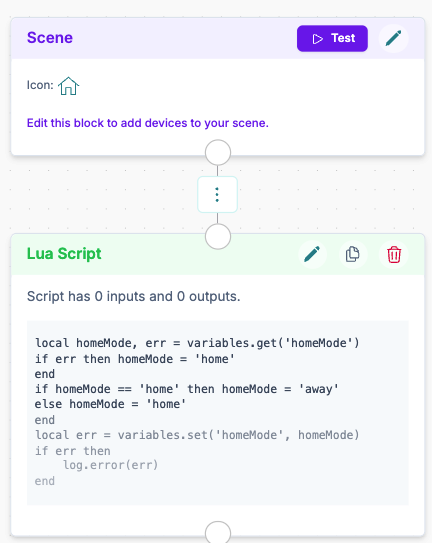
Create a scene. Add a Lua Script block that reads the current homeMode, flips it between home and away, and stores it back as a shared variable:
local homeMode, err = variables.get('homeMode')
if err then homeMode = 'home'
end
if homeMode == 'home' then homeMode = 'away'
else homeMode = 'home'
end
local err = variables.set('homeMode', homeMode)
if err then
    log.error(err)
end
local homeMode, err = variables.get('homeMode')
if err then homeMode = 'home'
end
if homeMode == 'home' then homeMode = 'away'
else homeMode = 'home'
end
local err = variables.set('homeMode', homeMode)
if err then
log.error(err)
endThe first time the scene runs, homeMode isn't set yet, so get returns an error and the mode defaults to home before being flipped. Each later trigger toggles between home and away.
2. Read it and react
In an automation, read the variable and act on it — here we turn a button's LED on or off.
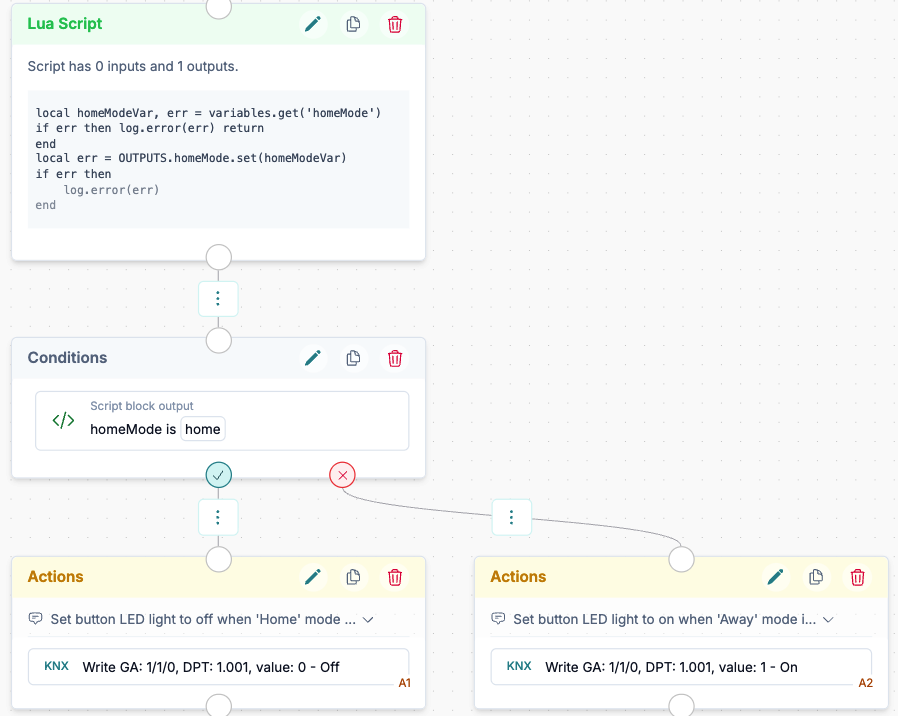
First, add a Lua Script block. On the left side, define a Text output named homeMode (see Outputs). Then read the variable, check for an error, and write it into that output:
local homeModeVar, err = variables.get('homeMode')
if err then log.error(err) return
end
local err = OUTPUTS.homeMode.set(homeModeVar)
if err then
    log.error(err)
end
local homeModeVar, err = variables.get('homeMode')
if err then log.error(err) return
end
local err = OUTPUTS.homeMode.set(homeModeVar)
if err then
log.error(err)
endNext, add a Condition block. Choose the Previous Block Result condition type, pick the homeMode output from the Lua Script block, set the operator to is equal to, and enter home. The automation then branches on the result — for example, turning the button LED off when the mode is home and on when it is away.
TIP
This example uses in-memory variables, so the mode is cleared if the server restarts. To remember it across restarts, swap variables.set / variables.get for variables.setPersisted / variables.getPersisted.
See also
- Lua Script — where you write the scripts that use variables.
- Conditions — branch an automation on a variable read into an output.
- Adding and linking blocks — how blocks connect to each other.